

Medication Side Effect Reporting Assistant
Get Your Side Effect Report Ready
Use this tool to collect all critical information for your doctor visit. The FDA recommends including these 8 elements to ensure your report is actionable and complete.
Tip: Patients who document side effects using this framework are 63% more likely to have a complete report that gets acted upon.
Ever felt a new rash, dizziness, or weird fatigue after starting a pill and wondered how to tell your doctor without sounding dramatic? Getting your medication side effects on record isn’t just about your own safety-it feeds the whole drug‑safety system that protects everyone. Below is a step‑by‑step guide that turns a vague complaint into a clear, actionable report that your provider can act on fast.
Why Reporting Matters
When you share a side‑effect story, you join a network that catches dangerous drug patterns early. The U.S. Food and Drug Administration’s (FDA) MedWatch is the official FDA program for collecting adverse drug event reports from patients, clinicians, and manufacturers processes over a million reports a year. About 30% of label changes between 2008‑2022 came directly from these spontaneous reports. In other words, a single, well‑documented report can spark a label warning that prevents thousands of serious reactions.
Prepare Before You Talk
Think of your report as a mini‑case study. A short checklist saves you from forgetting crucial details and cuts the time you spend in the exam room.
- Identify yourself: age, gender, weight.
- List the medication: brand name, generic name, dose, and if you have the lot number.
- Describe the reaction: what it looks like, where it appears, and how severe it feels.
- Timing is key: when you started the drug and exactly when the symptom began (e.g., "rash appeared 72 hours after the first 50 mg dose").
- What you’ve tried: stopped the drug, taken an over‑the‑counter remedy, or visited urgent care.
- Other meds and foods: current prescriptions, supplements, or interactions like grapefruit juice.
- Lab results (if any): elevated liver enzymes, blood counts, etc.
- Photos or videos: a quick snap can boost validation by 40%.
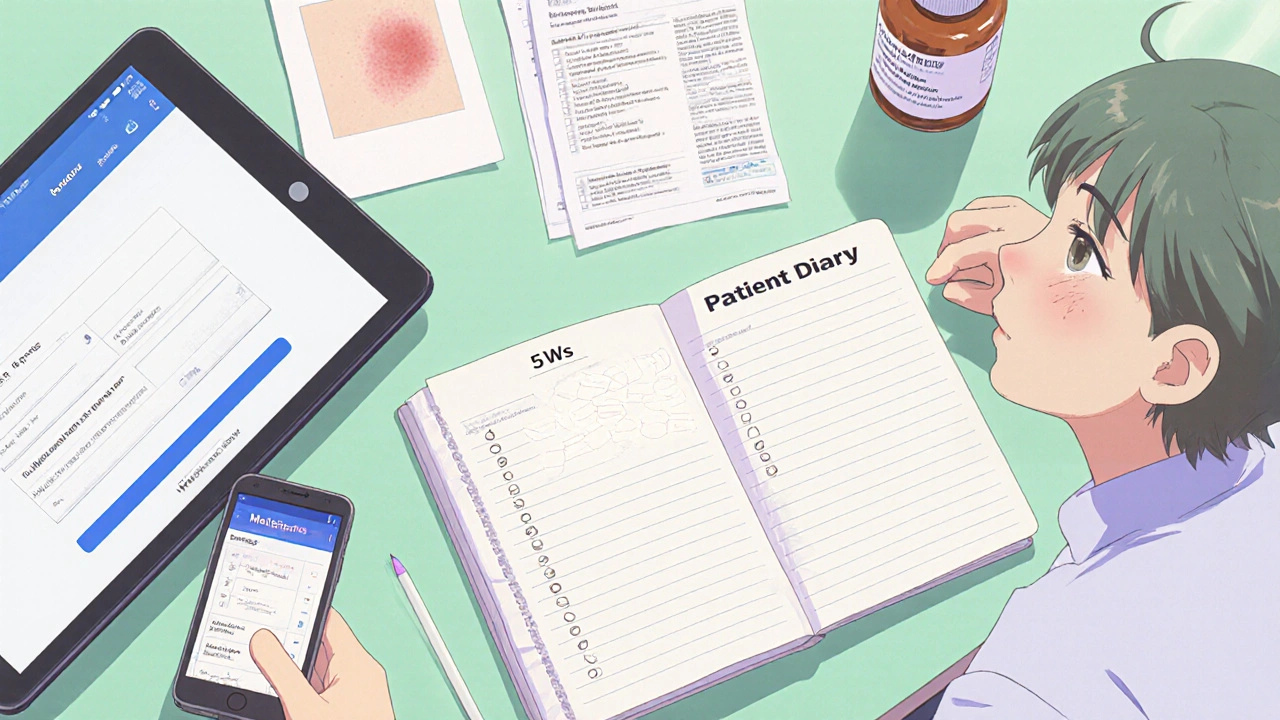
Patients who keep a patient diary a daily log of medication timing and symptom onset are 63% more likely to have a complete report.
Use the "5 Ws" Framework
When you sit down with your provider, structure the conversation with the classic journalistic "5 Ws"-it forces clarity and helps the clinician fill the required fields.
- What: describe the symptom (e.g., "a pruritic, red rash on my forearms").
- When: exact onset ("started 10:30 AM, two hours after taking the medication").
- Where: body location.
- Why you suspect the drug: any known side‑effect profile or timing pattern.
- What makes it better or worse: does resting help? does it flare after meals?
This approach mirrors the FDA’s own guidance that precise timing makes a report 5.2 times more likely to establish causality.
Pick the Right Communication Channel
Not every office visit is created equal. A 2022 study of 12,450 reports showed the following average completeness (out of 10 required elements):
| Method | Avg. Elements Completed | Typical Turnaround |
|---|---|---|
| In‑person visit | 8.7 | Same day |
| Secure patient portal | 7.2 | Within 24 hrs |
| Phone call | 5.8 | 1-2 days |
| Traditional mail | 4.3 | 1 week+ |
If the reaction is easy to see (a rash, swelling), an in‑person visit wins for immediate assessment. For more subtle issues (headache, fatigue), a patient‑portal message lets you attach photos and a diary, boosting completeness while saving time.
Leverage Technology
Modern Electronic Health Record (EHR) systems often have built‑in adverse‑event fields. When you request a 20‑minute “medication concern” slot, most providers can pull up a template that auto‑populates the medication name and dosage. Epic’s 2023 analysis showed this cut documentation time from 22 minutes to just 7 minutes per report.
Two tools are especially handy:
- MedEffect Mobile app: lets you fill a structured report on your phone, then send it directly to your provider’s EHR. Over 247 000 downloads in the first month attest to its usefulness.
- AI‑assisted symptom checkers (e.g., Epic’s Suki): they suggest likely adverse‑event codes based on your diary entries, increasing the chance the report lands in the right FDA field.
Ask for Confirmation
After you’ve given the details, request a quick recap: "Can you write down exactly what we discussed in my chart?" This ensures the information is captured in a structured format that can be forwarded to the FDA if needed. Studies show that when providers document the report in the medical record, patient satisfaction jumps to 4.7 stars compared with 3.6 for vague, undocumented mentions.
Follow Up
Don’t assume the conversation ends at the door. A short follow‑up message through the patient portal-"I’ve attached the lab results we discussed last week"-keeps the report fresh and signals you’re serious about safety. If the provider escalates the report to MedWatch, you’ll receive a confirmation number within a few days.

Common Pitfalls and How to Avoid Them
| Pitfall | Impact | Fix |
|---|---|---|
| Leaving out timing details | Report less likely to prove causality | Write exact clock times in your diary. |
| No photos or objective measures | Validation rate drops 42% | Snap a picture with a timestamp. |
| Using vague language ("feeling off") | Provider may dismiss as "normal" | Use CTCAE grading (mild, moderate, severe). |
| Rushing the conversation | Only 3.2 minutes usually spent on side‑effects | Schedule a dedicated 20‑minute slot. |
Applying the Naranjo Adverse Drug Reaction Probability Scale a questionnaire that assigns a score to estimate the likelihood a drug caused an event can also help you present the severity in a medically recognizable way.
Key Takeaways
- Gather all specific details-drug name, dose, exact timing, symptom description, and any labs.
- Use the 5 Ws framework to keep the conversation focused.
- Choose the most complete channel: in‑person for visual reactions, secure portal for documented, photo‑rich reports.
- Leverage EHR templates, the MedEffect Mobile app, or AI tools to speed up documentation.
- Ask for written confirmation in your chart and follow up if you don’t receive a report number.
Frequently Asked Questions
Do I have to report every minor side effect?
It’s best to mention any new symptom, even if it feels minor. Minor reports help build a fuller safety picture and sometimes reveal patterns that lead to label changes.
Can I submit a report directly to the FDA?
Yes, through the MedWatch online portal or the MedEffect Mobile app, but the quickest route is usually through your provider, who can forward the report and ensure it’s tied to your medical record.
What if my doctor dismisses my concern?
Politely ask for a written note of what was discussed. If the provider still won’t document, request a second opinion or bring your diary, photos, and lab results to the next visit.
How long should I track symptoms before contacting my doctor?
Aim for at least three days of consistent tracking. That window gives you enough data to spot patterns and provide the timing details the FDA values.
Is there a cost to using MedWatch or MedEffect?
Both services are free for patients. The only cost might be a data plan if you’re uploading photos, but the apps themselves don’t charge.
By turning a vague feeling into a well‑documented, timed, and photographed report, you give your provider the tools to act quickly and help the national safety network keep medicines as safe as possible. Remember, your voice is a powerful piece of pharmacovigilance.




Comments (9)